Work sample · Independent project
An AI workflow for faster, more reliable project delivery
- Scope
- Prompt workflows for eight lifecycle phases, plus meetings, reporting, and decision support
- My role
- Designer and author of the workflow, the prompts, and the review standards
- Basis
- AI practice from my previous roles, the PMBOK® Guide, and formal training in AI for project management
- Platform
- The organization's approved AI platform, set up to meet its security and data policies
- Status
- Complete, 2026, and ready to fit each new team's tools
In short
This workflow brings AI into every phase of the project lifecycle. At each phase, AI acts as a thinking partner: it asks the questions a vague request leaves open, challenges the plan from angles a busy team can miss, and spots weak points while there's still time to fix them. It also turns raw notes into first drafts in my PM toolkit's templates, and every output is reviewed and approved before anyone else sees it.
The situation
Why I built it
Most project problems are visible early to someone looking from the right angle: a scope question nobody asked, a dependency nobody mapped, a risk everyone assumed someone else owned. Used well, AI is that extra angle. It never tires of asking what's missing, and it drafts in minutes what used to take an afternoon.
AI also writes with confidence whether or not it's right. The answer is structure: standard prompts for each role and a check at every handoff. This workflow builds that discipline into every phase, so the extra thinking and speed come with accuracy built in.
My role
What I owned
The workflow is my design. I decided where AI adds speed, where a person has to step in, and how each draft gets checked.
Workflow design
Each lifecycle phase maps to the documents it produces, the inputs AI needs, and the review gate each draft passes before anyone else sees it.
Prompt writing
Every prompt is written to produce a specific deliverable in a set format, from scoping questions to a sponsor-ready status report.
Review standards
Accuracy rules sit inside the prompts themselves: work only from the sources, tag gaps and guesses, and flag disagreements instead of resolving them quietly.
What I did
Key decisions
Brief AI like a new team member
Every prompt states the situation, the role AI should take, the exact output format, and the limits on what it may use. Vague prompts get generic drafts; complete briefs get usable ones.
Set up the workspace once
The charter, plan, risk register, glossary, and reporting standards live in one AI project, so every conversation starts with the full context instead of a re-explanation.
Facts come from the sources, never the model
Prompts limit AI to the material provided. Missing information is tagged [MISSING], inferences are tagged [ASSUMPTION], and conflicting sources are flagged for me to settle.
A built-in second opinion
Major drafts get a reviewer pass: a separate prompt that hunts for unsupported claims, missing items, and wording that sounds more certain than the evidence allows.
Drafts arrive in the team's format
Prompts point to the PM toolkit templates, so a charter or status report comes back ready to review, not ready to reformat.
Inside the workflow
A review gate in every phase
AI drafts the documents in each phase. A person checks them against a defined standard before they're used.
| Phase | What I check before it's used |
|---|---|
| Initiating | Charter figures against the business case; sponsor and authority confirmed |
| Scope and requirements | Every requirement traces to a source; nothing added by the model |
| Planning | Estimates against team input; critical path confirmed in the scheduling tool |
| Risk | Owners agree to their risks; every trigger is measurable |
| Stakeholders and communication | Nothing in the register I wouldn't want that person to read |
| Executing and status | Colors match the agreed thresholds; reviewer pass completed |
| Change control | Cost and schedule impact recalculated by hand |
| Closing | Outcomes measured against the charter's objectives |
| Meetings and logs | Decisions and owners confirmed with the people involved |
Work sample
The workflow in action
The complete workflow covers every project phase, plus meetings, reporting, and decision support. This sample walkthrough shows ten of its steps, following one project from a one-line request to closeout. Each step shows the prompt, an excerpt of the AI output, and what I changed before it was used.
- 1 · Clarify the requestA one-line request from the CEO becomes a set of scoping questions.
- 2 · Draft the charterScoping answers and the business case become a charter draft, with gaps tagged instead of guessed.
- 3 · Break the scope into a WBSCharter deliverables become work packages, then AI checks its own draft for gaps.
- 4 · Sequence the workThe team's estimates become a draft schedule; the scheduling tool confirms the critical path.
- 5 · Hold a pre-mortemThree stories of how the project failed become a scored risk register with measurable triggers.
- 6 · Map stakeholders and plan communicationThe RACI and my notes become a register and a standing communication plan.
- 7 · Write the weekly status reportA week of notes becomes a sponsor-ready report, with each color tied to an agreed threshold.
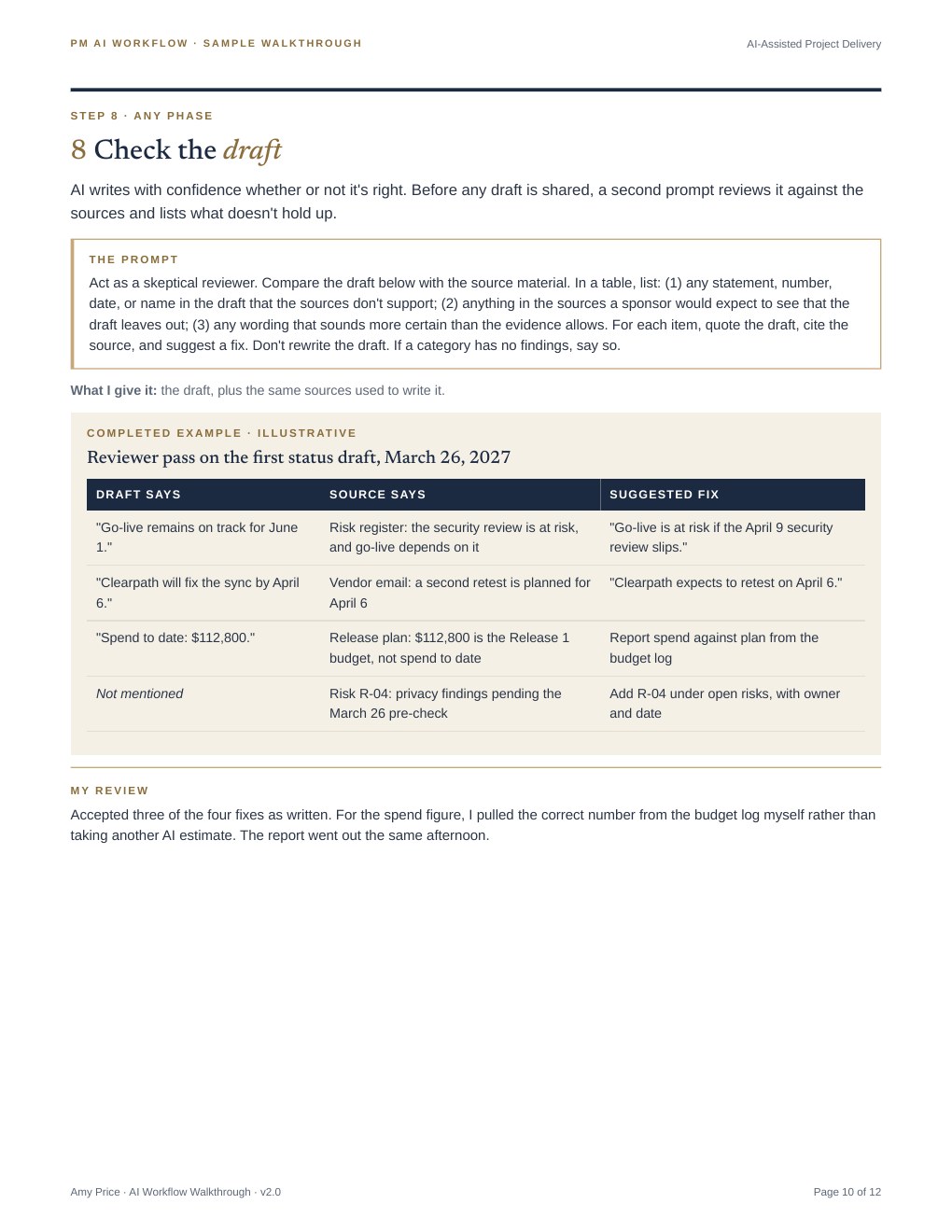
- 8 · Check the draftA reviewer pass compares the draft with its sources and lists what doesn't hold up.
- 9 · Assess a change requestA proposed change is measured against every baseline, with the cost math shown line by line.
- 10 · Close out and capture lessonsResults are compared with the charter, and each lesson gets an owner.
Complete workflow available on request.
Sample prompt · the reviewer pass
Act as a skeptical reviewer. Compare the draft below with the source material. In a table, list: (1) any statement, number, date, or name the sources don't support; (2) anything a sponsor would expect to see that the draft leaves out; (3) any wording that sounds more certain than the evidence allows. For each item, quote the draft, cite the source, and suggest a fix. Don't rewrite the draft.
The walkthrough uses the same fictional company as my PM toolkit, Northfield Creative Group. Names, dates, and figures are illustrative. The workflow and prompts are my own design, drafted with AI support and approved by me before publishing.
Guardrails
Rules that apply to every step
- Approved tools only: client, confidential, and health information goes only into AI tools the organization has approved for that data.
- Every figure verified: numbers, dates, and names are checked against the source before anything is shared.
- Certainty matches evidence: wording is reviewed so a forecast never reads as a promise.
- People decide: AI drafts. The project manager approves and sends.
In practice
Bringing it to a new team
- Weeks 1 to 4: Confirm which AI tools are approved and what data can go into them. Set up the project workspace with the team's own charter, plan, and reporting standards.
- Months 2 and 3: Start with the workflows that save time every week, such as status reports, meeting notes, and action logs. Show the team the results in live demonstrations, so adoption builds from what people see working.
- Ongoing: Refine the prompts as tools and team needs change, and keep a shared prompt library so good prompts become team standards.
Looking ahead
What's next
AI tools change quickly, and the workflow is built to change with them. My next step is to add automated steps where a tool can safely handle routine updates, such as log maintenance and meeting follow-ups, while keeping a person's review on everything a stakeholder sees.